

Create Your XBTFX Account
First, you'll need to register for an account on XBTFX, the trading platform that hosts TechMonegy's MAM. Click the button below to open the registration page and fill in your details.
Open Registration PageVerify Your Email
Check your email inbox for a verification code from XBTFX. Enter the code or click the link in the email to verify your account.
Check your spam or junk folder. The email should arrive within a few minutes. If you still don't see it, you can request a new code from the verification screen.
Deposit Funds
XBTFX accepts multiple deposit methods including USD, EUR, Bitcoin, and stablecoins (USDT, USDC). However, the TechMonegy MAM operates in Bitcoin (BTC), so your funds will need to be in BTC before you can join.
Make sure you have a BTC balance in your wallet before proceeding to Step 4. You'll receive an email when your deposit is confirmed.
Join the TechMonegy MAM
Once your deposit is confirmed and you have Bitcoin in your wallet (either from a direct BTC deposit or by converting via the Exchange), it's time to subscribe to TechMonegy's managed account.
Go to TechMonegy MAM Page-
Click the "Follow" button on the TechMonegy profile
-
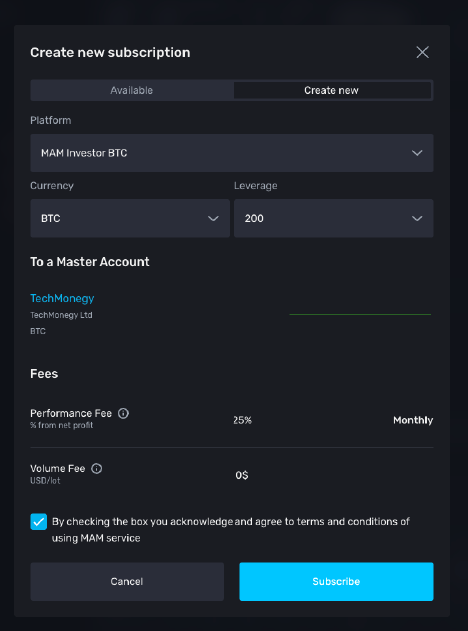
Select "Create new" to create a new investor account
-
Check the box to agree to the MAM terms and conditions
-
Click "Subscribe" to complete your subscription
TechMonegy charges a 25% performance fee (monthly) on profits only. There is no volume fee. You only pay when you make money.
Transfer Funds to Your Investor Account
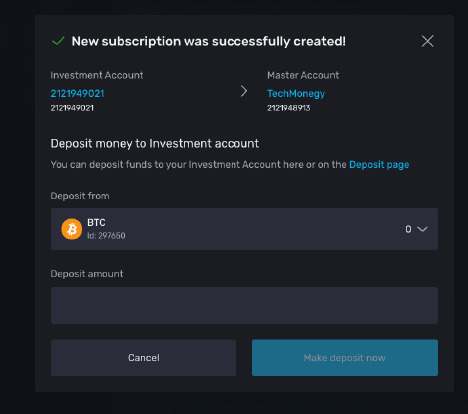
Final step! Move your Bitcoin from your wallet to your new investor account so TechMonegy can start managing your funds.
-
Go to MAM → Account List in the left sidebar
-
Find your investor account and click the "Transfer" button
-
Select your BTC wallet as the source
-
Enter the amount you want to invest and confirm the transfer
You're All Set!
Your investment is now being professionally managed by TechMonegy. You can monitor your account performance anytime from your XBTFX dashboard.